
Tech
How AI Is Changing Video Editing: From Chat-Based Instructions to Finished Content

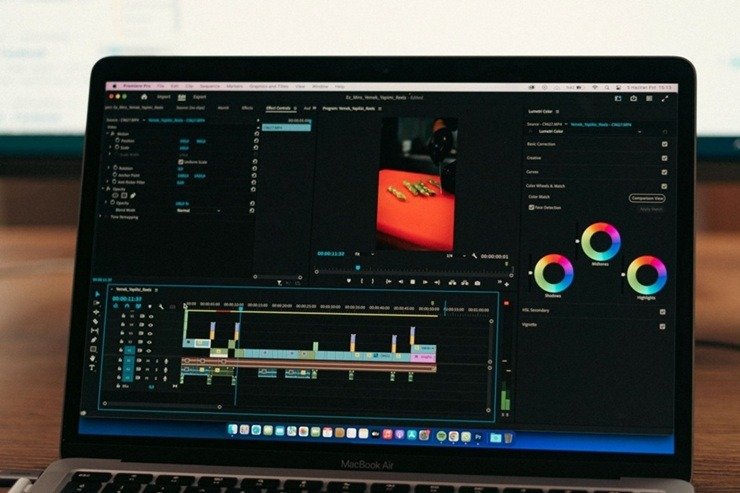
Video editing has traditionally required a combination of technical skills, creative judgement, and patience. Even a short social media video can involve sorting footage, cutting unwanted sections, adding captions, adjusting audio, choosing transitions, creating thumbnails, and exporting multiple versions.
AI is changing that workflow. Instead of starting with a blank timeline and manually completing every step, creators can increasingly describe what they want in natural language and use AI to help organise assets, develop a rough cut, generate visual elements, and refine the final project.
The important shift is not that AI completely replaces video editors. Rather, it is becoming another layer between the creator’s idea and the editing timeline.
What Is a ChatGPT Video Editor?
The phrase “ChatGPT video editor” can describe workflows where conversational AI is used to plan or perform parts of a video-editing process through a connected editing platform.
A creator might provide footage and describe an intended result, such as:
Create a 30-second product video, remove pauses, place the strongest clips first, add readable captions, and format it for vertical viewing.
Instead of manually deciding where every clip should go, an AI-assisted workflow can help interpret those instructions and prepare an editable starting point.
CapCut’s current CapCut × Codex workflow is an example of this approach. It can use uploaded footage and natural-language instructions to help identify useful moments, remove unwanted sections, arrange clips, and prepare an editable rough cut that can then be refined in CapCut.
The distinction between an AI assistant and a traditional editor is important. AI can accelerate repetitive work, but creators still need to review the story, pacing, captions, audio, visuals, and final export.
How AI Video Editing Works
AI-assisted editing generally involves several stages.
1. Understanding the Brief
The process can begin with a natural-language description rather than a detailed editing timeline.
You might specify the audience, platform, duration, tone, aspect ratio, important scenes, or sections that should be removed.
The clearer the instructions, the easier it is for an AI system to understand the intended outcome.
2. Analysing Source Footage
Once footage is available, AI can help identify clips based on factors such as spoken content, visual moments, scene changes, or the instructions provided by the creator.
This can be particularly useful when working with hours of footage. Manually watching every clip to find a few usable moments is often one of the least creative parts of editing.
3. Building a Rough Cut
Rather than producing a supposedly perfect final video, a useful AI workflow creates a starting point.
A rough cut can establish the sequence, approximate pacing, and basic structure. The editor can then remove weak shots, adjust timing, change transitions, and make creative decisions.
This approach is more practical than expecting one prompt to produce a finished piece that requires no review.
CapCut × Codex and Conversational Video Editing
One example of this emerging workflow is CapCut × Codex.
The platform describes a process where users upload footage, explain how they want it edited, and receive an editable first cut. The workflow can help organise footage, select useful moments, and structure clips while keeping the project editable for further work.
Creators looking for a ChatGPT video editor can therefore think of this type of technology less as an autonomous replacement for traditional editing and more as a way to reduce the setup involved in getting from raw footage to an initial timeline.
That distinction matters. An editable draft gives the creator control over the final result. After the AI-assisted stage, users can still change clip order, timing, captions, audio, effects, and other creative elements.
Why Natural-Language Editing Is Useful
Traditional editing software exposes a large number of controls. This provides flexibility, but it can also make simple tasks feel complicated for new creators.
Natural-language interfaces offer a different starting point.
Instead of thinking about which button performs a particular function, users can explain the desired outcome.
For example:
- “Remove long pauses from the interview.”
- “Make this a 45-second vertical video.”
- “Put the strongest product demonstration first.”
- “Create a shorter version for social media.”
- “Add captions and keep them easy to read.”
- “Use a faster pace during the introduction.”
The AI system can then translate the request into editing actions or a proposed structure.
This can make video creation more accessible, particularly for people who understand their content but do not have extensive editing experience.
AI Is Also Changing the Visual Production Process
Video editing is only one part of modern content production. Creators also need thumbnails, backgrounds, product imagery, illustrations, social graphics, title cards, and other visual assets.
Recent image-generation systems are making this part of the process more interactive.
OpenAI’s ChatGPT Images 2.5, for example, has introduced improvements to image generation and editing, including better instruction following, richer visual detail, and new interaction methods such as sketches and annotations.
This matters for video creators because an image does not necessarily exist in isolation. A generated visual may become a video thumbnail, an opening frame, a background, a product graphic, or an element inside a social media edit.
Using AI-Generated Images Alongside Video
A creator working on a promotional video might need several visual assets before opening the editor.
They could start with a text description or reference image, generate a visual direction, compare alternatives, and then bring the selected asset into the video project.
Tools built around ChatGPT Images 2.5 can support this type of image-generation and refinement workflow. CapCut’s related workflow describes starting from text, sketches, or reference images and then refining elements such as composition, backgrounds, colours, and textures.
This creates a more connected production process:
Idea → visual concept → image assets → video draft → editing → final export
Instead of treating image generation and video editing as completely separate activities, creators can use them as parts of the same content workflow.
AI Video Editing Does Not Remove the Need for Human Review
One of the biggest misconceptions about AI editing is that automation eliminates creative judgement.
In practice, the opposite can be true.
AI may select a technically suitable clip that does not fit the story. It may produce captions that need correction. A generated image may contain a small visual error. An automated edit may be too fast or too slow for the intended audience.
Human review is therefore essential.
Creators should check:
- Whether the selected clips actually support the story
- Caption accuracy
- Names, numbers, and other factual details
- Audio levels
- Music licensing
- Visual consistency
- Brand guidelines
- Generated-image imperfections
- Aspect ratio and framing
- The final export quality
AI can make the first 80% of a task easier while leaving the most important creative decisions to the person making the video.
AI Editing for Social Media Creators
Short-form content is one of the clearest use cases for AI-assisted editing.
Creators often need to turn one long recording into several pieces of content. That could include a full YouTube video, short vertical clips, quote videos, teaser content, thumbnails, and different versions for multiple platforms.
AI can help identify possible highlights and prepare variations, reducing repetitive editing work.
However, every platform has different audience expectations. A clip that works well on one channel may need a different opening, duration, caption style, or framing elsewhere.
The creator should therefore treat automated versions as starting points rather than publishing everything without review.
AI Video Editing for Businesses
Businesses can also benefit from AI-assisted production.
Marketing teams frequently create:
- Product demonstrations
- Tutorials
- Training videos
- Customer explainers
- Social media advertisements
- Internal presentations
- Event highlights
- Short educational videos
The main benefit is not necessarily eliminating editors. Instead, AI can help small teams produce more content without making every simple edit a lengthy manual project.
A marketing employee could prepare a rough concept and source material, use AI to organise the first version, and then have a designer or editor complete the final creative pass.
What AI Still Struggles With
AI video tools have improved quickly, but they still have limitations.
Context can be difficult. A system may understand that a clip is visually interesting without understanding why it is important to the overall story.
Taste is another challenge. “Good editing” is not universal. A fast-paced TikTok video, a corporate training presentation, and a cinematic documentary require very different choices.
There are also practical concerns around copyright, privacy, consent, licensing, brand safety, and the use of third-party footage or images.
Creators should make sure they have the necessary rights to use source material and should review the policies of the tools they use.
The Future of AI Video Creation
The most interesting development is not simply better automatic cutting. It is the growing connection between different parts of the creative process.
A future workflow could begin with a conversation about an idea, generate a script, create visual references, organise existing footage, produce a rough edit, generate captions, create thumbnail concepts, and prepare multiple platform-specific versions.
The creator would then review the work rather than manually performing every repetitive operation.
That does not mean traditional editing disappears. Instead, the role of the editor may shift toward direction, judgement, storytelling, and quality control.
Final Thoughts
AI is making video creation more conversational and accessible. A creator no longer has to think exclusively in terms of timelines, tracks, cuts, and individual editing commands. Natural-language instructions can increasingly become part of the production process.














How AI Is Changing Video Editing: From Chat-Based Instructions to Finished Content

Why Continuing Education Matters for Massage Therapists

A Career Direction Is a Hypothesis, Not a Verdict

How AI Image Generators Are Changing the Way You Create Visual Content

How To Choose A Vehicle That Fits Your Life

From Side Hustle to Internet Phenomenon: Why Foot Content Became an Online Business

Gut Health Supplements: What Actually Rebuilds Digestion with Ayurveda

How B2B Procurement Technology Builds Stronger Supplier Networks

How to Buy Pre-IPO Stock in 3 Steps

A Closer Look At The New Z library Official Domain In 2026

100 Motivational Quotes to Inspire You in 2026

How to Create a Vision Board That Actually Works (2026)

22 Best Self-Help Books to Read in 2026

How to Achieve Personal Growth in 2026

New Year Wishes and Quotes to Inspire and Celebrate (2026)

Loeb Smith reviews: Why Crypto Licensing Demands Patience, Structure, and Skepticism

Custom Cover Letter Generator: Create Tailored Letters in Minutes

How to Leverage Personal Development for Career Advancement

Top Fitness Coach Certification Programs for Aspiring Trainers

From Denver to Vail: Secrets, Snow, and Soul of the Rockies
-

 Motivation6 years ago
4 Fun New Hobbies To Try This Year
-

 Quotes3 years ago
53 Motivational Gym Quotes to Fuel Gym Workout
-

 Quotes11 years ago
50 Most Powerful Quotes Ever Spoken
-

 Travel2 years ago
Why You Should Travel More: The Many Benefits of Seeing the World
-
 Quotes9 months ago
100 Motivational Quotes to Inspire You in 2026
-

 Quotes2 years ago
43 Inspirational Quotes About Thoughts
-

 Quotes4 years ago
Motivational Quotes by Famous People
-

 Quotes1 year ago
100 Motivational Quotes to Start Your Day with Positivity