
Tech
How Admissions Teams Use Viddo AI For Campus Walkthroughs

Campus tour videos often determine whether prospective families book an in-person advisory session, yet school communications staff frequently struggle to produce fresh facility walkthroughs when admissions windows open. Rather than letting outdated media sit on public course portals or waiting months for studio crews, regional schools can keep recruitment media active by turning verified campus photographs into concise motion assets with viddo ai before open house dates approach.
Coordinating an outside film crew during busy exam periods introduces logistical friction that most administrative offices cannot easily absorb. Hallway sound dampening, student photo permissions, and unpredictable equipment setups turn a straightforward lab overview into a multi-week project. Operating from high-resolution still photographs that administration has already approved allows recruitment officers to present modern academic spaces promptly, establishing a dependable standard for seasonal enrollment marketing.
The Cost Bottleneck In Traditional Campus Video Production
School outreach managers must communicate learning environments clearly across diverse channels, including regional directories, parent community portals, and event displays. High school open house presentations, international student intake sessions, and vocational workshop spotlights all require short video clips that display facilities realistically. Commissioning dedicated videography for every newly upgraded computer lab or renovated sports complex creates a persistent budget barrier that strains departmental allocations.
Production agencies typically charge substantial day rates for camera operators, lighting technicians, and sound engineers, followed by separate fees for timeline editing and color grading. For mid-sized institutions operating under disciplined operational budgets, spending thousands of dollars on a three-minute facility reel means reducing funds for classroom supplies or scholarship outreach. Furthermore, academic calendars leave very narrow windows where empty lecture halls can be lit and filmed without interrupting scheduled lectures.
Scheduling Delays Across Active Academic Semesters
Academic calendars are notoriously crowded with testing periods, parent conferences, and term breaks. Locking down filming permits inside specialized chemistry laboratories or digital media suites requires synchronizing facility managers, faculty heads, and student schedules. If a filming day encounters rainy weather or sudden maintenance work, the shoot is pushed back by weeks, often causing the completed promotional package to miss the primary admissions intake deadline entirely.
When promotional materials arrive after parents have submitted preliminary applications, the financial investment delivers minimal recruitment impact. Administrative teams end up relying on static PDF brochures on their exhibition desks, wishing they possessed dynamic video snippets that could run on digital lobby screens or recruitment table tablets. Addressing this timeline friction requires a workflow that converts existing institutional photography into smooth video material without relying on complex physical filming logistics.
Transforming Verified Campus Stills Into Smooth Walkthroughs
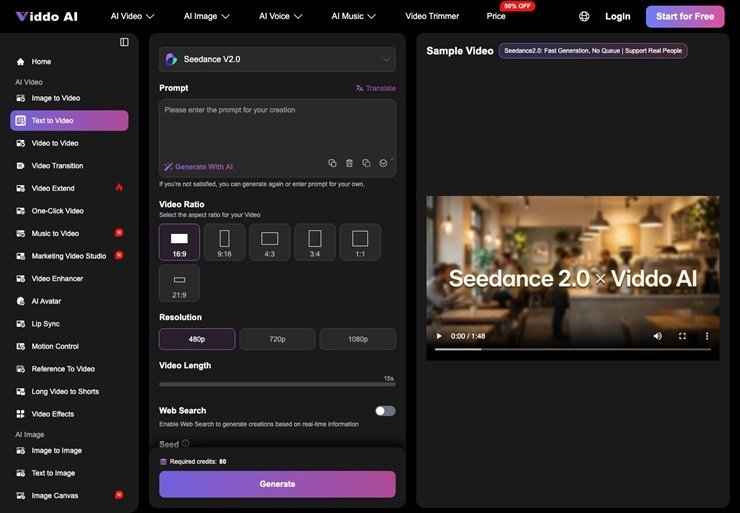
Modern campus communications thrive when visual assets remain authentic to the physical site. Every accredited institution maintains an archive of certified photography showing sunny courtyard vistas, modern STEM workstations, and spacious library desks. By integrating Viddo AI into the admissions content pipeline, communications staff can upload approved photographic records and instruct motion models to generate gentle panning shots, daylight transitions, or subtle focus adjustments that highlight campus architecture naturally.
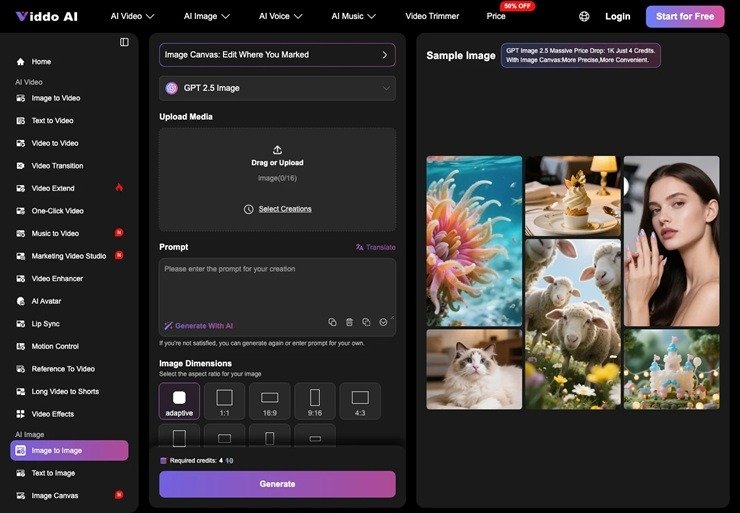
Instead of hiring an outside production crew for every departmental update, an ai video generator gives the administrative desk direct control over pacing and orientation. An outreach officer can select an approved wide-angle photograph of the new robotics lab, specify a smooth forward tracking motion, and obtain an engaging six-second tour sequence within minutes. The resulting media preserves structural proportions and equipment positions, ensuring prospective families see an honest representation of educational resources.
Anchoring Multi-Angle References Across Facility Shots
A frequent challenge in generative video generation is preventing specialized equipment or building facades from morphing during camera movement. In educational facilities, specialized tools like 3D printers, laser cutters, or musical instruments must retain their exact mechanical layout. Viddo AI addresses this consistency requirement through its multi-reference framework, allowing users to supply up to nine reference images alongside prompt directions to lock essential spatial relationships securely.
By uploading both the primary front perspective and complementary side-angle photographs into the reference panel, the motion synthesis engine respects physical boundaries. A woodshop lathe or biology dissection microscope remains mechanically solid throughout the clip rather than blurring into distorted shapes. Admissions staff can confidently showcase specialized laboratories knowing that technical details adhere strictly to institutional inventory.
Extending Clip Duration For Clear Facility Demonstration
Brief motion snippets are useful for social feeds, but comprehensive campus tours require continuous visual progression from an entrance corridor into main study areas. The Extend Video function within the workspace allows creators to prolong an initial four-second render into an extended sequence while preserving architectural perspective, lighting balance, and surface textures across the entire clip.
Administrators simply select the approved output clip and extend the timeline with directional instructions, such as sweeping from the study tables toward the digital archive terminals. This modular extension keeps visual pacing calm and dignified, avoiding the abrupt, rapid-cut aesthetics common in social video filters and maintaining the reflective atmosphere expected of serious academic institutions.
Comparing Production Workflows For Admission Media Desks
Evaluating video creation workflows requires school marketing officers to balance expenditure, turnaround velocity, and asset fidelity. The following operational comparison outlines standard requirements between conventional studio shooting, basic manual slideshow tools, and generative still-to-video production tailored for educational institutions.
| Evaluation Criteria | On-Location Studio Production | Static Slideshow Transitions | Viddo AI Still-To-Video Flow |
|---|---|---|---|
| Turnaround Horizon | Two to four weeks for booking, filming, and post-production | Under an hour using basic presentation software | Ten to fifteen minutes from approved still to rendered clip |
| Campus Disruption | Requires room closures, lighting rigs, and crew supervision | None, relies entirely on archived graphic files | None, utilizes existing campus photography |
| Spatial Immersion | High, captures live motion and physical depth | Low, limited to flat panning and digital zooms | Substantial, generates realistic parallax and depth cues |
| Resource Allocation | Substantial commercial filming budget per session | Negligible software cost with low engagement return | Controlled workspace subscription with on-demand expansion |
| Facility Updates | Requires re-hiring crews whenever a room is renovated | Simple image swap without true cinematic motion | Single updated photograph generates new motion immediately |
As indicated in the operational comparison, generative video production provides an optimal middle ground for institutions that require elevated production quality without continuous capital expenditure. Communications officers can refresh recruitment videos immediately whenever new laboratory benches, athletic equipment, or outdoor pavilions are introduced to the school catalog.
Reviewing Architectural Clarity Before Public Enrollment Release
Before any generated video snippet is uploaded to an admissions portal or embedded within an application guidebook, the media team must conduct a disciplined quality inspection. Educational content must withstand close scrutiny from observant parents and accreditation evaluators who expect total accuracy regarding campus amenities. An initial review should verify that campus signage, building numbers, and institutional banners remain legible throughout the camera trajectory.
If a generated sequence causes outdoor department lettering or directional signs to drift into garbled glyphs, communications staff should narrow the motion prompt or adjust the reference strength. When checking architectural typography, using clean test strings like Hamburgefonts helps verify that lens motion does not stretch letterforms unnaturally. Retaining legible building identity ensures promotional videos convey authority, stability, and institutional pride across all public admissions channels.
Strategic Allocation For Modern Education Communications
Adopting generative motion tools enables regional schools to compete effectively alongside major private institutions that operate lavish promotional budgets. By capitalizing on verified photographic archives and streamlined still-to-video processing, administrative teams can maintain lively visual presences without overextending operational funds. High-resolution laboratory displays, serene library halls, and welcoming auditorium spaces can be animated responsibly to support recruitment cycles throughout the academic year.
Viddo AI serves as a dependable creative partner for educational institutions seeking to modernize their admissions outreach. Communications teams gain the agility needed to respond to changing application deadlines, spotlight newly opened facilities promptly, and provide prospective students with engaging visual journeys into their future learning environments.











How Admissions Teams Use Viddo AI For Campus Walkthroughs

The Trouble with Being Right

Remembering With Love: Meaningful Ways to Honor Someone After Loss

5 Things to Know Before Your First Art Auction

Running Research Labs: Essential Resources to Enhance Operations

Simple Ways to Monitor the Health of Chickens and Farm Animals

Losing Important Travel Documents Doesn’t Have to Ruin Your Plans

Why Baltimore First Responders Choose EMDR Therapy Baltimore for Operational Stress Injuries

Feeding for Recovery: What Helps Horses Bounce Back After Hard Work

Why Local Businesses in Houston Utilize Storage Units Houston Tx for B2B Operations

100 Motivational Quotes to Inspire You in 2026

How to Create a Vision Board That Actually Works (2026)

22 Best Self-Help Books to Read in 2026

How to Achieve Personal Growth in 2026

New Year Wishes and Quotes to Inspire and Celebrate (2026)

Loeb Smith reviews: Why Crypto Licensing Demands Patience, Structure, and Skepticism

How to Choose the Best Manali Tour Package for a Family-Friendly Vacation?

Your Guide to Building the Life You Want as a Medical Professional

Romantic Cabins In Tennessee: A Guide to Location, Privacy, And Scenic Views

AI SEO Tools Every Website Owner Should Know
-

 Motivation6 years ago
4 Fun New Hobbies To Try This Year
-

 Quotes4 years ago
53 Motivational Gym Quotes to Fuel Gym Workout
-

 Quotes11 years ago
50 Most Powerful Quotes Ever Spoken
-

 Travel2 years ago
Why You Should Travel More: The Many Benefits of Seeing the World
-
 Quotes11 months ago
100 Motivational Quotes to Inspire You in 2026
-

 Quotes3 years ago
43 Inspirational Quotes About Thoughts
-

 Quotes4 years ago
Motivational Quotes by Famous People
-

 Quotes1 year ago
100 Motivational Quotes to Start Your Day with Positivity