
Tech
Nano Banana 2.5 and the Rise of Prompt-Led Image Creation

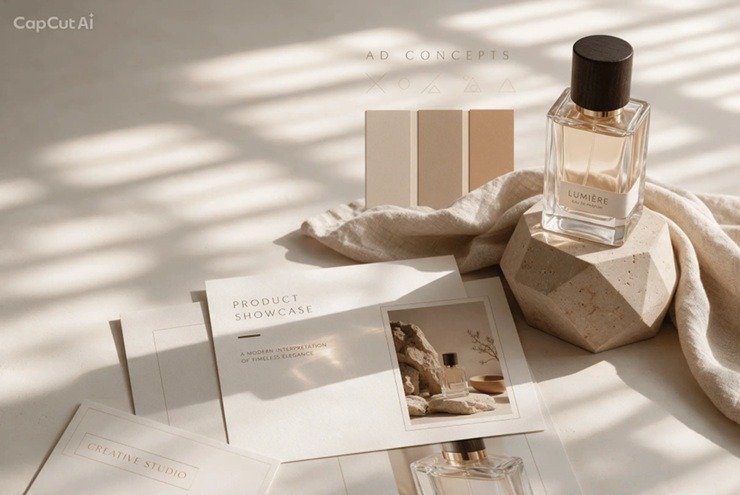
A few years ago, making a polished graphic meant opening a design suite, sourcing assets, and spending hours on layers and masks. Today, plenty of creators start with a sentence. Type what you want, adjust the wording, and compare the results. Interest in Google’s Nano Banana image models, and in searches for names like Nano Banana 2.5, shows how quickly this style of creation has moved from novelty to everyday workflow.
Why This Category Took Off
Prompt-based image tools appeal because they collapse the distance between an idea and a first draft. A marketer can test five poster concepts before a meeting. A teacher can mock up a lesson graphic in minutes. A small business owner can explore packaging directions without hiring an illustrator for early brainstorming.
Two capabilities drive most of the excitement:
- Text-to-image generation, where a written description becomes a new visual.
- Image-to-image editing, where an existing photo, sketch, or product shot guides the result, so you can change selected details while keeping the rest recognizable.
Nano Banana has drawn attention mainly for the second of these. Editing an image with plain-language instructions, such as changing a background, adjusting lighting, or restyling a scene, feels closer to giving directions to a collaborator than operating software.
What People Mean by “Nano Banana 2.5”
It helps to be precise here. Nano Banana is associated with Google’s image-model family, and version-style labels like 2.5 circulate mostly as search terms while people look for the latest capabilities. Anyone researching Nano Banana 2.5 should keep in mind that the name describes a model family and the interest around it, not a single product every platform offers.
That distinction matters in practice. Different platforms build their own image-generation workflows and offer different models, so it’s worth checking what a given tool provides instead of assuming a name guarantees a specific engine. CapCut’s own page on the topic states this plainly: Nano Banana remains a Google model, while CapCut provides its own image generator and image-to-image workflows, with Nano Banana Pro available and 2.5 listed as coming soon. Clear labeling like that saves creators from confusion.
Writing Prompts That Actually Work
Whichever model you use, the quality of the output tracks the quality of the brief. A few habits consistently help:
Be specific about the subject and setting. “A matcha cake on a marble counter, soft morning light, shallow depth of field” beats “a cake photo.”
Specify composition early. Decide whether the image is a square post, vertical story, or widescreen banner before generating. Leaving room for headlines and keeping subjects clear of the edges saves rework later.
Spell out any text. Text inside images has historically been a weak point for generators. If you need a headline or label, state the exact wording, its placement, and the desired contrast, then proofread the result carefully before exporting. Misspelled characters are still worth checking for.
For edits, name what must stay the same. With reference-based editing, saying which elements to preserve, such as a product’s shape, a logo, or a person’s likeness, is as important as describing what should change.
Iterate in small steps. Change one variable at a time so you can tell which instruction produced which effect.
From Generated Image to Finished Asset
Generation is only the first half of the job. Most usable visuals need a finishing pass: cropping for a platform, extending a background, removing a stray object, sharpening low-resolution output, or isolating a subject on a transparent background. This is where all-in-one creative platforms have an edge over standalone generators, because the draft and the polish happen in the same place.
CapCut’s toolkit reflects this approach. Alongside its image generator, it offers an upscaler, inpainting for targeted repairs, and background removal, plus a route into video for creators who want to animate a still. For teams producing social content at volume, keeping these steps together reduces the friction of moving files between apps.
Practical Use Cases
The technology fits a wide range of everyday work:
- Social content. Thumbnails, story backgrounds, and campaign concepts that can be tested quickly.
- Product visuals. Scene ideas and ad concepts, using a reference image so the product stays accurate.
- Storyboards and comics. Exploring character designs, camera angles, and lighting before committing to production.
- Education and presentations. Diagrams and illustrated slides with clear visual hierarchy.
- Localization. Adapting the same visual direction across languages while keeping layout and style consistent.
Responsible Use
As these tools improve, a few cautions apply. Review generated text and fine details before publishing, since errors can slip through. Be careful with images of real people, and respect brand and copyright boundaries when using references. If AI-generated visuals appear in commercial work, check the licensing terms of the platform you’re using. And when comparing tools, judge them on what they can do today rather than on version numbers or hype.
The Bottom Line
Prompt-led image creation has changed who gets to make visuals and how fast they can iterate. Whether you’re following developments around Google’s Nano Banana models or simply looking for a dependable way to turn ideas into graphics, the best approach is the same: write clear briefs, iterate deliberately, verify the details, and finish the asset for its destination. The models will keep changing, but those habits will keep paying off.













Success at Work, Meaning at Home: Redefining What a Successful Life Looks Like

Hit by a Lyft Driver? Steps to Protect Your Health and Your Claim

How Financial Planning Can Help You Build a More Secure Future

Underground Water Leak Detection Services: Essential Considerations for Homeowners

Why People Wear Fragrance Even When They’re Staying Home

Hair Transplant Technology in Istanbul

Creating Your Own Rituals for Rest, Reflection, and Personal Time

How Hiring A Professional Plumber Saves You Money On Water Bills

Plumbing Emergencies: A Homeowner’s Guide for Finding a Plumber Near Me

Why Homeowners Trust Professionals for Drain Cleaning in Portland

100 Motivational Quotes to Inspire You in 2026

How to Create a Vision Board That Actually Works (2026)

22 Best Self-Help Books to Read in 2026

How to Achieve Personal Growth in 2026

New Year Wishes and Quotes to Inspire and Celebrate (2026)

Loeb Smith reviews: Why Crypto Licensing Demands Patience, Structure, and Skepticism

How to Leverage Personal Development for Career Advancement

Top Fitness Coach Certification Programs for Aspiring Trainers

From Denver to Vail: Secrets, Snow, and Soul of the Rockies

How to Choose the Best Manali Tour Package for a Family-Friendly Vacation?
-

 Motivation6 years ago
4 Fun New Hobbies To Try This Year
-

 Quotes4 years ago
53 Motivational Gym Quotes to Fuel Gym Workout
-
 Quotes11 years ago
50 Most Powerful Quotes Ever Spoken
-

 Travel2 years ago
Why You Should Travel More: The Many Benefits of Seeing the World
-
 Quotes10 months ago
100 Motivational Quotes to Inspire You in 2026
-

 Quotes3 years ago
43 Inspirational Quotes About Thoughts
-

 Quotes4 years ago
Motivational Quotes by Famous People
-

 Quotes1 year ago
100 Motivational Quotes to Start Your Day with Positivity